Jekyll2026-04-10T21:35:34+00:00https://writing.markchristian.org/feed.xmlideas and ramblingsSo long, ICQ2024-05-26T00:00:00+00:002024-05-26T00:00:00+00:00https://writing.markchristian.org/2024/05/26/so-long-icqSo, ICQ is shutting down. I decided to log in one last time, since I still, miraculously, have my original credentials. UIN 5437541, password unchanged since 1998—still rolls right off the fingers.
This isn’t what ICQ actually looked like for me when I was using it, but this is the closest I can get to a little snapshot in time before it’s gone forever. I was, apparently, a 21 year old geek from Halifax. “Seen a long time ago”.
The identities behind some of the screen names here have been lost to the sands of time. Although some of them were friends from real life, many more were ephemeral friends from the ether. I don’t have any idea who vertmamba was; I remember heyheystranger being a pretty close internet friend, but I don’t remember anything about her now. I talked to one of the people on this list earlier today.
ICQ really was something special to me. I was absolutely glued to it for most of 1998 in particular, although I used it for years and years. I made some great friends on there:
PaQwrat was a 40-something mom who had the biggest MP3 collection I was aware of. If you wanted anything at all, odds were she had it—and if she didn’t, that was a challenge to be met.
pookie was a random college student in, I think, Wisconsin. Sometimes his girlfriend would be on his account, and she was also fun to talk to. I often find myself thinking about one of his random away messages: “why use sham poo when you can use real poo?”. Memory is the oddest thing.
arleyrose was a girl my age who lived somewhere in New York; she taught me about Björk and The Sugarcubes and Tori Amos. We were both super excited when Garbage released Version 2.0. She wanted to go to art school when she graduated high school.
astracity2000 was an Australian named Simon who used to make a bunch of different virtual pet games for Windows 98. He eventually ended up moving to Canada for a year and lived in my mom’s basement for a few months.
bleach (Dan) was a college kid named Dan, somewhere in Ontario, with much better web design skills and the ability to actually use Photoshop. I had a picture he made as my desktop wallpaper for months and months. (He used to make techno songs, too. I have a few of them kicking around somewhere still.)
ICQ was the first social media platform I ever made a home on, and the uh-oh! notification sound will be etched in my mind forever. It’s hard to believe it’s been more than a quarter of a century since I was using it all day long; it’s even harder to believe that I’m still talking to some of those internet friends on a regular basis.
]]>Wither offline mode?2023-05-09T00:00:00+00:002023-05-09T00:00:00+00:00https://writing.markchristian.org/2023/05/09/wither-offline-modeOne of the major driving factors for the move to Single-Page Applications (SPAs) over the past decade has been the potential to allow offline (or low-connectivity) usage. When any given interaction within an app has the potential to require a network request, having a fast, reliable internet connection is critical.
SPAs trade the need for constant connectivity into a desire for constant connectivity, offsetting that requirement by pre-loading code and data up-front for future use. If you can wait just a few seconds longer at the start of your session, the logic goes, then you’ll have a faster and more responsive user interface that also happens to be capable of working offline.
Whether or not this trade-off makes sense depends on a wide variety of factors, most obviously how long user sessions actually last for, but also how much time is invested in building a compelling offline experience in the first place.
SPAs don’t instantly and magically become fully offline-capable applications just by virtue of existing. Somebody needs to decide which features—is it all of them? just mission-critical ones? a random, unknowable subset?—will work offline, and which ones won’t. What happens when you try to use a non-offline-capable feature? Does it fail gracefully or just…kind of break? How will a user know why something isn’t working or isn’t available right now? How much effort do we want to put into user education and onboarding for an edge case?
Managing the loading of data, how it gets cached, how it gets invalidated, and just what happens when there’s no connectivity at the moment all requires substantial thought and investment.
The sorts of engineers who spend their time thinking about data flow, reconciliation, and cache invalidation are certainly not in the majority at the average tech co. At best, a large product team could hope to have one or two domain experts who think about “offline mode” as a concept, with the remaining team members breaking it from time to time, as you’d expect with any other niche feature.
At best, pervasive offline support exists as a sort of tax on all other feature development. The same can be said for things like accessibility & localization, but unlike with those two things, offline mode is not a moral imperative for enfranchising large groups of humanity1.
At a prior employer, some of the loudest voices for offline mode (both internally and externally) were executives who spent a lot of time trying to get work done while traveling. Even this fairly unrelatable use case offers an increasingly less persuasive argument for implementing a full-featured offline mode, since decent internet connectivity on airplanes, in airports, and on the road is virtually guaranteed in many parts of the world.
Depending on the geographical location of your users, some base level of connectivity can be assumed, and the shift from “no connectivity” to “low connectivity” can actually be fairly profound. In a low connectivity environment, an application that leans on a remote server to do the heavy lifting can actually lead to a better user experience overall.
The difficulty of implementation, the ongoing maintenance costs, and the vanishing user base all add up to a feature that just doesn’t make sense a lot of the time. At some fundamental level, offline mode just isn’t part of the web’s DNA, and—for a lot of us—it’s probably time to let it go.
Without the distraction of offline mode, more HTTP-first programming models such as HTMx start to look more viable. Web browsers have had millions, if not billions, of dollars of collective investment over the past three decades. They are some of the most capable and ambitious pieces of software ever written—and yet it’s commonplace for small teams of developers to toss aside large pieces of built-in browser functionality in favor of doing everything from scratch.
This is folly. Web browsers are incredible, and building web applications against powerful servers is a proven, scalable, and efficient technique. It’s time to return to the old ways and let our JavaScript garbage collectors take a bit of a breather—they’ve earned it.
However, I find myself increasingly skeptical. Although our devices are astoundingly capable and getting better on an annual basis, local-first software does not seem like the future to me: the benefits of the cloud are simply too great, and the average person just does not care about abstract ideas like data sovereignty.
An argument could be made against this statement, given that pervasive high-speed internet connectivity is not a given in many parts of the world. This is certainly outside my area of expertise, but it seems to me that people in those markets are not the most likely target audience for the average VC-funded SaaS web application circa 2023.
↩︎
]]>Communicating Cartridges2019-06-29T00:00:00+00:002019-06-29T00:00:00+00:00https://writing.markchristian.org/2019/06/29/communicating-cartridgesA lot of contemporary video game players take online communications for granted—after all, online services have been a standard feature in consoles for nearly fifteen years at this point1. However, before the ubiquity of the internet there was a time when some clever cartridges let gamers run up to the bleeding edge of technology and peer into the future.
Today, let’s close out our cartridge series by taking a look at a few cartridges that offered some form of connectivity for otherwise isolated consoles. As always, this isn’t a comprehensive list of everything that existed—it’s just a brief survey at some of the more notable or interesting high points.
This is the final part of a four part series on the wonders of video game cartridges. Start at the beginning by reading about lock-on cartridges.
Head-to-head competition between players has been part of the appeal of video games from their earliest days. Although the fantastic graphics of games like Street Fighter II were light-years beyond the simple shapes of Pong, they shared a competitive spirit. Those competitions had always been a face-to-face affair, but in the early 90s, a small group of ex-Apple engineers realized that modems, a network communications technology growing in popularity on home computers, had the potential to revolutionize video games as well. They formed a company called Catapult Entertainment and began work on the XBAND, an inexpensive modem built into a pass-through video game cartridge, along with an online service for it to communicate with. The XBAND service would let gamers play a selection of ordinary, off-the-shelf video game cartridges against other players, regardless of their physical location. It was a mildly miraculous accomplishment, especially given the relatively small size of the company and the fact that they were third-party developers, rather than the designers of either the consoles or the games.
Sega Genesis version
The first XBAND model was released for the Sega Genesis in late 1994, and a Super NES version came out the following summer. Although these two consoles are completely different in terms of both hardware and software, the XBAND modems were fairly similar: they sat between the consoles and the game cartridges (just like the Game Genie did), and they added seemingly magical new capabilities (again, just like the Game Genie did). Gamers simply plugged a telephone line into the side of their XBAND cartridge and away they went…after signing up their monthly service, of course. Only a handful of games on each system were XBAND capable, but those that were offered something special; namely, they offered online play with automated matchmaking from the comfort of your living room.
Super NES version
XBAND was released at a crossroads, coming out just as people were realizing that network connectivity was going to be a big part of everyone’s life in the future, but before it became obvious that the internet was going to be how that networked future would land. Catapult Entertainment eventually managed to sign a peak of fifteen thousand subscribers up to the XBAND service, but those numbers weren’t sufficient to sustain the company. Grand plans for future iterations of the hardware for other platforms, including PC and sega Saturn, never really panned out. The network was shuttered in April 1997, less than three years after the initial model was released.
Despite the lack of long-term success, it’s still hard to declare the XBAND a failure. A small team saw the future and delivered a system with online matchmaking, news, and email nearly a decade before the launch of Xbox Live or the PlayStation Network. In hindsight, what they accomplished was amazing, put simply.
Wrestling with Gaming recently released an hour-long documentary about the XBAND, featuring extensive interviews with the folks who built it. It’s an impressive piece of documentary work, especially given the fact that it’s largely the effort of a single person, and is highly recommended for anyone interested in this sort of thing.
Years before anyone started using coaxial cables for speedy internet access, Sega Channel was already proving that those cables were useful for more than just television. Introduced in a dozen US test markets at the end of 19932, Sega Channel made its official debut in December 1994 and expanded across the US and into Canada over the course of 1995 and 19963.
Sega Channel cartridge
Sega Channel consisted of a special cartridge with a coaxial input on the back, paired with an online service that offered a rotating set of downloadable games each month. Gamers just had to sign up for the Sega Channel service and screw an ordinary-looking coaxial cable onto a connection on the back of the cartridge. Once this was done, they were off to the races: the Sega Channel service had a feed teasing new releases and info about games, as well as a rotating selection of downloadable games at no additional cost. Although most of the titles were just downloadable versions of ordinary Genesis games, the service was also home to a number of US-exclusives, including a relatively sought-after Genesis port of the first three NES Mega Man games entitled The Wily Wars.
Unfortunately, Sega Channel didn’t really catch on for a variety of reasons. For one, the infrastructure of most cable providers wasn’t tuned for this sort of use case: a bit of electrical interference that might show up as a hard-to-notice bit of noise or discoloration in a television broadcast could completely break the Sega Channel. Providing reliable service meant cleaning up noise and interference on every part of the path between the cable company’s service building and the end-users house, which was a pretty tall order for a niche service like this. The service was also relatively expensive considering the target demographic was mostly kids and teenagers: $15 per month in 1994 (about $25 in 2019 dollars). Ultimately, the limited set of cities that did offer it weren’t able to attract enough subscribers enough to keep the service afloat.
Sega Channel was an early example of a digital service being provided atop the legacy analog cable network, but there would be more services to come in the future—the foundation laid by cable providers to make Sega Channel work set the stage for the ubiquitous cable modems that took over home internet service in the early 2000s.
The Japanese strategy board game shogi is a distant relative of chess with a long and fascinating history4. Despite its popularity in Japan—it’s even more popular there than the chess that Westerners are familiar with—shogi is virtually unknown in the rest of the world. To wit, there are versions of shogi for just about every console, but Morita Shogi 64 for Nintendo 64 is something special.
Surprise! There's an RJ-11 telephone jack on top.
A quick look at the cartridge reveals its secret: there’s an ordinary-looking telephone jack on the top of the cart, giving this cartridge the honour of being the sole Nintendo 64 game to feature a built-in modem to enable online play with no additional hardware. Despite being a Japanese exclusive, Morita Shogi 64 managed to attract the attention of the Western gaming media. “It’s unlikely this game will make it to the United States,” said the January 1997 issue of Electronic Gaming Monthly (inadvertently snubbing their Canadian readers), “but the new cartridge design raises an interesting question: Could Nintendo adopt this plug-and-play approach for other N64 games?”
An RJ-11 telephone jack (middle top) and plenty of extra circuitry make this a very special cartridge.
The answer ended up being a resounding “no,” although Nintendo did end up releasing a dedicated modem cartridge for use with their Japan-exclusive Nintendo 64 Disk Drive add-on and its online service, Randnet5.
Unfortunately for shogi fans in the 21st century, Morita Shogi 64 relied on an internet-based gaming service rather than direct player-to-player phone calls, and this online service is no longer available6. This means that even if you manage to find another shogi enthusiast who also happens to have their own Nintendo 64 cartridge and landline telephone, you still wouldn’t be able to play with each other. Alas.
These three cartridges aren’t the only examples of communicating carts that existed, but they offer up a pretty interesting historical perspective when looked at holistically.
As in many other areas of life, the near misses are often more interesting than the big successes. XBAND almost succeeded in creating a viable third-party cross-platform gaming network—something that never happened again7. Sega Channel almost got digital downloads to catch on a decade before they hit the mainstream8, proving that a game subscriptions offered a viable business model for video games. Morita Shogi 64almost ushered in an era of smart cartridges with their own communication capabilities, console be damned.
And with that, our look back at the amazing versatility of the humble video game cartridge has come to an end. Tune in next month when we’ll be taking a look at the forgotten art of the tech concept video.
Many thanks to my patient and helpful wife, Nathalie, for copyediting this article.
Want to hear about the next article when it's published? Sign up for a one-time notification here—no spam or recurring emails, I promise.
Microsoft was quick to the draw with Xbox Live, launched in November of 2002. The Nintendo Wi-Fi Connection followed in November 2005, and Sony’s PlayStation Network followed in November 2006. The fact that all three of these had launch dates in November probably indicates that they were trying to make it in time for the holiday season.
↩︎
Generally speaking, the US and Canadian rollout of the Sega Channel is quite well documented, but details on its release in other countries are relatively sparse.
↩︎
Shigo and chess are part of the same family of games that can trace their history back to the beginning of the middle ages. It’s ultimate origin is unknown, although most scholars believe it originated somewhere in India. The Wikipedia article is a fascinating read.
↩︎
Randnet was a short-lived online service available only in Japan. Operating for just fourteen months, Randnet offered basic internet access, including email, chat, and online gaming, and access to an exclusive Nintendo newsletter. The name Randnet is a tortured portmanteau for “Recruitand Nintendo Network”—Recruit being the name the media company that Nintendo partnered with to build the service.
↩︎
Despite relatively extensive searching, I have been unable to find the end date for the online service. If anyone happens to know when the service was shut down, I’d love to hear about it.
↩︎
The closest modern analogues are the various social systems that were added to some Android and iOS apps prior to the integration of similar features into the platforms (Game Center on iOS in 2010 and Google Play Games on Android in 2013). OpenFeint is probably the most familiar one for most people. Even these still aren’t perfect comparisons because the big idea behind XBAND is that Catapult Games would make XBAND work with games created and released by third-parties without their support or permission.
↩︎
Microsoft was way ahead of Sony and Nintendo when it came to downloadable games, introducing Xbox Live Aracde in May 2004. Sony and Nintendo were both more than two years behind, with the PlayStation Store launching in November 2006 and the Wii Shop Channel hot on its heels in December 2006.
↩︎
]]>Sensors in Game Boy cartridges2019-05-11T00:00:00+00:002019-05-11T00:00:00+00:00https://writing.markchristian.org/2019/05/11/sensors-in-cartridgesBy the late 90s, most home video game consoles had moved from cartridges to optical discs. With few exceptions, however, most portable consoles never moved to optical discs; instead, they stuck with cartridges and gradually migrated to downloadable content1. Cartridges were relatively small, just rugged enough for the task, and they didn’t need to delicately focus a laser on a tiny spinning disc in a device that was constantly shifting around. As time went on, advances in miniaturization meant that ever-more-advanced hardware capabilities could be packed into tiny cartridges, a trend that eventually led to cartridges including bespoke sensors to augment their capabilities.
Today, we’ll take a look at three releases for three different generations of the Nintendo Game Boy platform, each of which included extra hardware for some clever enhancements. These inauspicious cartridges give us a glimpse into where Nintendo thought mainstream technology would eventually lead them, and therefore offered a glimpse into the future. Let’s get started.
This is part three of a four part series on the wonders of video game cartridges. Start at the beginning by reading about lock-on cartridges.
Released for the original Game Boy in 1998, the Game Boy Camera was an unusually shaped cartridge which included a fully functional digital camera and enough memory to store thirty photos. Despite producing photos that were microscopically tiny and grainy by modern standards, the Game Boy Camera was a big deal around the turn of the millennium, and it was even certified as the world’s smallest digital camera in the 1999 edition of The Guiness Book of Records2.
The Game Boy Camera software was made by a company called Game Freak, a name that might ring a bell for any Pokémon fans out there—Game Freak is the primary developer of the Pokémon series, having made everything from Pokémon Red and Blue (1996) to the upcoming Sword and Shield (due in 2019). Creating the software for the Game Boy Camera is an odd entry in the history books3 of a company whose output has otherwise been dominated by a single overwhelmingly popular franchise.
Appropriately given the playful platform it was created for, Game Boy Camera included a fun, quirky user interface that evoked the aesthetics of Nintendo’s WarioWare series. Off-kilter characters decorate every screen, and nearly everything jiggles and moves while it’s being used The cartridge not only let users take photos, it also allowed them to apply stickers or doodles to the photos, with the stickers looking just as kooky as everything else.
Although digital photography was hardly unknown by the time the Game Boy Camera came out, it would still be several years before camera phones4 became commonplace and blew the doors off pervasive amateur photography. Before then, Game Boy Camera offered a relatively inexpensive medium for creative exploration and, given the time frame it was released in, an interesting glimpse into the early days of a movement that would eventually have a huge impact on society.
A few years ago, blogger David Friedman shared a treasure trove of Game Boy Camera photos of New York City, taken in 20005. It’s a wonderful, clunky, pixelated time capsule, and there are plenty of other examples of Game Boy Camera photos on Flickr6.
Given the lack of a sequel of any sort, it’s probably safe to assume that the Game Boy Camera wasn’t a tremendous hit for Nintendo. That being said, the company obviously still had a soft spot for the idea of photography: the Nintendo Wii shipped in 2006 with a digital photo gallery app, and the DSi (2009), 3DS (2011), and Wii U (2012) all featured built-in cameras. And although most people don’t have much use for a clunky, low-resolution black-and-white digital camera in 2019, the Game Boy Camera continues to see a lot of aftermarket attention. Clever folks have built a variety of methods for getting the images off the camera and onto computers7, although your humble author has always been perfectly happy just taking a photograph of the Game Boy screen with his smartphone.
Kirby Tilt ’n‘ Tumble was the first instance of a new form of gameplay input being built into a Game Boy cartridge8. Released for the Game Boy Color in 2000, this bright pink cartridge had an accelerometer inside, making it possible—mandatory, actually—for players to control the titular character by tilting their Game Boy.
The gameplay is roughly on par with numerous tilt-controlled mobile games from the late 2000s—Kirby, rolled into a ball, must be guided to an exit by tilting the Game Boy, and he collects items on his way. Requiring the gross manipulation of a real-world object rather than having a player just push buttons lent the game a novel sort of intensity, and it was generally well-received. Despite the positive reception, no additional games with accelerometers were ever released for the Game Boy Color (although there were two for the Game Boy Advance9.
Players had to manually calibrate the accelerometer.
Tumble was created by a company called HAL Laboratory, a second-party developer10 that has enjoyed a close relationship with Nintendo for many years. HAL Laboratory’s president, Satoru Iwata, took a job at Nintendo roughly around when this game was released, going on to become president of Nintendo itself two years later. Given the timing, one has to wonder if Mr. Iwata brought an interest in motion controls with him to the larger company. After all, the Wii, released in 2006, was all-in on motion controls, not to mention powered by accelerometers not unlike the ones inside of Tumble. Of course, we don’t have to swallow this conspiratorial bent wholesale—the first iPhone, released in 2007, also made heavy use of accelerometers, ultimately leading to a deluge of motion-controlled mobile games over the first few years of its life. It’s possible that accelerometer-powered motion control was just an idea whose time had come.
The second entry in the long-running WarioWare series, 2004’s WarioWare: Twisted! for the Game Boy Advance not only featured a custom input, but a custom output as well: a gyroscope detected how the player was holding their Game Boy Advance, and a small vibrating motor offered a rumble feature for force-feedback. Although the rumble feature wasn’t novel, the gyroscope was11.
Like its predecessor, Twisted! was a compilation of so-called “microgames”, small challenges that had to be explained, understood, and completed in just a few seconds. Most of the microgames in this iteration relied on the gyroscope, requiring players to twist and rotate their Game Boy in a particular way under immense time pressure. Twisted! was a big hit for Nintendo and the first step in transforming the WarioWare concept from a one-hit wonder to a long-running series. In the fifteen years since it was released, six additional sequels have been released.
Twisting Wario's spine back into alignment in one of the microgames.
Just as with Kirby Tilt ’n‘ Tumble, if you squint hard enough, you can see Twisted! as a step on the road toward the Wii. A few years after the Wii was released, its accelerometer-based controllers were supplemented by a gyroscope-powered add-on called the MotionPlus. Accelerometers, as used in Kirby Tilt ’n‘ Tumble and the original Wii controller, measure acceleration. This is useful for measuring changes in orientation or sharp movements, but they can’t really detect how you’re actually holding something.Gyroscopes, Instead of measuring movement, measure orientation, which enables a much finer sort of motion control. When these two sensors are combined together, as they are in the MotionPlus, very precise motion control is possible.
Twisted! was the only WarioWare game to include custom hardware, but the experimentation with gameplay styles continued on: Touched! (2004) made use of the DS stylus, Smooth Moves (2006) relied on Wii’s motion controls, and Snapped! (2008) used the DSi camera. The WarioWare series is a sort of proving ground for quirky gameplay ideas, and its experimentation with novel forms of input got started here.
Each of these cartridges brought something new and interesting to their respective consoles, but building additional hardware into cartridges had its downsides. Most obviously, these cartridges were more expensive to make, meaning the additional hardware really had to be worth the extra effort. It’s not surprising that this practice was a relatively rare occurrence, but, sometimes, it could lead to novel—and even unique—experiences for players.
So, in keeping with the recurring theme from this series, it’s worth taking yet another moment to appreciate the amazing flexibility that cartridges offered gamers during their heyday. Next time, we’ll close this series out with a look at some cartridges that really thought outside of the box, offering gamers connectivity to the outside world. Stay tuned.
This is part three of a four part series on the wonders of video game cartridges. Continue on to learn about communicating cartridges.
Many thanks to my patient and helpful wife, Nathalie, for copyediting this article.
David Friedman wrote about the discovery on his blog in 2014, and was gracious enough to allow me to embed one of the photos in this post. Thank you, David.
↩︎
Flickr arrived a few years after whatever hey-day the Game Boy Camera had, but there are still plenty of wonderful photos to look through in the GameBoy Camera photo pool. As far as I can tell, this photo of a Christmas tree from 2004 is the first Game Boy Camera photo on Flickr.
↩︎
Options range from highly polished products like the BitBoy to do-it-yourself solutions like this Arduino-based solution. Vintage hardware enthusiasts can even pick up a MadCatz Camera Link, a product that was released back when the Game Boy Camera was still on the market.
↩︎
One could argue that this honour should go to the the Game Boy Pocket Sonar, a Japan-only fish locator, but since the sonar wasn’t actually used to control the minigames that were built into the cartridge, it doesn’t really count as an input device.
↩︎
]]>You should have a personal web site2019-04-29T00:00:00+00:002019-04-29T00:00:00+00:00https://writing.markchristian.org/2019/04/29/personal-web-sitesHello! This is my personal web site. It’s not much, but it’s mine. After nearly a decade of just barely existing, I’ve spent quite a bit of time in 2019 trying to breathe new life into it. At this point, I think just about everyone–but especially folks in the software engineering universe–should have a personal web site of their own. Let me tell you why.
A few months back, I walked into an interview with a candidate at work and introduced myself. The candidate was pleasant enough, and one of the first things they said to me was that they like to look people up before an interview to try to get to know them a bit. “You were a complete ghost online.”, they said.1
I’ve been active on the internet since the mid 90s, and I’ve probably cumulatively written hundreds of thousands of words on here in one way or another. I blogged nearly every day through the first half of the 2000s, and I was a noisy contributor on Twitter back when it was a fun, quirky distraction. Since about 2012, though, real life and relatively intense day jobs as a software engineer had taken away the interest in continuing to work on web stuff in my free time. Eventually, I eventually grew tired of the big internet sites, deleting my LinkedIn account (too many emails, dangit), abandoning Reddit, shutting down my Twitter presence, and deleting my Facebook content. All that was left of me online was a dusty corner of the web, forgotten2.
I didn’t say anything to the candidate, but I was a little unsettled by this revelation. Over the holiday break at the end of 2018, I decided to do something about it. I vowed to revive my personal web site and publish at least one substantial post per month, focusing on a topic that was always sure to keep my interest: vintage video game history.
So far, I’ve made my goal. I’ve got four 2,000+ word articles up that I’m quite proud of, and each one was easier to put together than the one before. Writing is a lot easier if you practice, and having an audience–even if it’s mostly imagined–is a pretty good motivator to keep at it. I’m also fortunate to have a patient wife who happens to be taking a course in copyediting right now, which means my writing practice can become her editing practice. It’s been a pretty great bit of synergy.
I’m by no means an expert on, well, anything, but I can crank out a post that I’m proud of pretty quickly. I like to write things out in a few big chunks, let them sit for a while, and do a few clean up passes before calling it a day and pushing it out. This isn’t just helping me become a better writer: I’m getting better at reading and editing other people’s writing as well, which definitely comes in handy at a large software company with technical proposals flying by all the time.
Of course, there’s more to a web site than filling it with content. In my day job, I have the good fortune of spending my time deep in the guts of a large client-side JavaScript application. I’m far removed from designing user interfaces and writing CSS, and this is definitely a benefit to our customers. However, just because I don’t want to work with HTML and CSS on a daily basis doesn’t mean I want my skills to completely atrophy. This web site is just complex enough to give me a playground: I think it looks relatively nice, and it’s been a good opportunity to remind myself how CSS works. I’ve made some nice layouts for articles that I’m pretty pleased with3, and I’m slowly chipping away at the terrible HTML & CSS I threw together here in 2012. A few of the things I’ve learned about (or reminded myself about) so far:
semantic markup with modern HTML elements like <article> and <nav>4
accessibility best practices for article-based web sites
how Slack unfurls work
how to design web sites that respect the notch on iPhone X and friends
how to use GitHub webhooks
how to write Jekyll plugins
how to embed videos in multiple formats that gracefully degrade down to being images
web site performance optimization
Chrome’s performance and accessibility auditing tools
The list goes on and on. Some of this overlaps with the stuff I deal with professionally, and some of it doesn’t. But when I touch an internal tool like this at work, I have to make sure I’m building something rock solid: hundreds of other people will use whatever it is tens of thousands of times, and even a bug that happens 1% of the time would be unacceptably high. Here? Whatever works. It’s freeing.
In conclusion: go for it. The best thing about the web circa 2019 is how huge it is. You’re not going to embarass yourself: just dig in and start building something. By the time anyone notices–if they ever do–you’ll probably be pretty pleased with what you’ve got.
This is pretty common, at least in my experience–plenty of people have told me that they looked me up before their interview. It’s actually a pretty nice signal that people are invested enough in the process to do some prep ahead of time.
↩︎
This originally said <sidebar> rather than <nav>, because that’s what I was using in my markup. Turns out I was using a fictious element by accident; many thanks to Petar Petrovic for pointing that out.
↩︎
My usage of both sed and bash was in service of trying to get better at using these fundamental tools. Usually, I reach for Ruby whenever I’m doing anything non-trivial in the terminal–it’s my favourite language for shell scripting and command line tools.
↩︎
]]>A system of cartridges2019-04-05T00:00:00+00:002019-04-05T00:00:00+00:00https://writing.markchristian.org/2019/04/05/systems-in-cartridgesLast time, we took a look at three cartridges that had a little something extra: a cartridge slot of their own for other cartridges to get plugged into. A few other cartridges took that idea a step further, cramming separate video game consoles into the cartridge slots of their host consoles. These were no ordinary hardware add-ons: they required completely distinct and incompatible cartridges of their own.
Today, we’re going to take a look at three very different consoles-in-cartridges from three very different companies. All of these companies had both technological and strategic reasons for coming into existence, and they all have an interesting story to tell. Let’s start with the most obscure one—the only unlicensed system in the set and the only one made by someone other than the console creator.
This is part two of a four part series on the wonders of video game cartridges. Start at the beginning by reading about lock-on cartridges.
Codemasters must’ve had quite an impressive research and development lab at their office back in the early 1990s. Originally founded to develop games for Commodore’s home computers, they’d branched out to creating unlicensed games and add-ons for the Nintendo Entertainment System (NES) within a few years. Their best-known product, at least for console gamers, is probably the Game Genie cheat device1, but that wasn’t their only piece of unlicensed NES hardware.
One of the most amazing things about video game cartridges was how much flexibility they offered. As technology progressed, cartridges became increasingly powerful to augment the hardware within the consoles themselves. The NES hardware dated back to mid-1983, and by the early 90s it was in need of all the help it could get. Later NES cartridges contained a wide range of components inside them, including everything from RAM to bank switching memory controllers or custom hardware mappers2.
Many cartridges for different games had identical hardware inside them, with the only difference being the game data stored within their ROM chips. Codemasters co-founder Richard Darling saw this and had the bright idea to create an add-on for the NES to make games simpler and less expensive. The Aladdin Deck Enhancer, released in November 1992, was the result. The Enhancer was an NES cartridge that contained everything except the game data, and it had a slot of its own for use with so-called Compact Cartridges. These Compact Cartridges would be much smaller than regular NES cartridges, and would consist solely of game data stored on ROM chips.
Dizzy the Adventurer on Compact Cartridge.
Codemasters hoped that the Enhancer could become its own viable target platform for publishers who were interested in bypassing Nintendo’s official licensing program and releasing their games on Compact Cartridges instead. By virtue of their smaller physical size and the fact that much of the circuitry needed by ordinary cartridges was built right into the Enhancer, Compact Cartridges could be sold at a much lower price than regular licensed NES games. Given the fact that it was released after the successor to the NES was already on the market, it’s quite clear that the Enhancer was targeting budget-conscious consumers who were less interested in the latest gadgets and just wanted to play some games.
Unfortunately for Codemasters, the idea never really took off. Despite promising that there would be twenty-four games on the market by the end of 1993, only seven games were ever released, and lots of unsold inventory sat around in warehouses for decades. Unbelievably, complete new-in-box hardware is still relatively easy to find online more than twenty-five years after release3.
The Super Game Boy was an add-on for the Super Nintendo Entertainment System (Super NES) that gave it the somewhat astounding ability to play Game Boy games. Not much larger than a regular Super NES cartridge, the Super Game Boy had a slot on its top edge that could fit standard Game Boy games. Once players inserted a Game Boy game and put the Super Game Boy into their console, they’d find themselves able to play their favourite portable games on their television sets for the first time ever. Given that the Game Boy was notorious for having a grainy, blurry, and dim screen, this was a tremendous improvement.
Although modern gamers are used to the idea of playing games for older systems on newer ones, the idea was still relatively novel in the early 90s4. Consoles in the 90s weren’t powerful enough to emulate other systems using software, so the Super Game Boy cartridge actually contains all of the internal hardware of a regular Game Boy within it. Despite being mostly just a Game Boy in a cartridge, the Super Game Boy had a few extra tricks up its sleeve.
Donkey Kong on the Super Game Boy, showing its custom border.
Super NES games were meant to be played on large television sets, rather than pocket-sized screens, which meant that they had a higher screen resolution than Game Boy games. This meant that when a Game Boy game was displayed on your television screen, its images would be inset by a border on all sides to make up the difference. Players could select from a variety of decorative borders that were built in, or they could make their own using virtual drawing tools. Players were also able to colourize the games they were playing, replacing the monochromatic shades of the Game Boy with a custom palette of their choosing. Some later Game Boy games came with custom borders built-in, and could also take advantage of the Super Game Boy hardware to display more in-game colours than usual5 Unfortunately for gamers, these sorts of enhancements never really caught on, but the ones that exist are fascinating6.
The Super Game Boy was released in 1994, five years into the life cycle of the Game Boy and three years after the release of the Super NES. The Super Game Boy was a clever move for a number of reasons. First of all, it expanded the size of the game library available to Super NES owners tremendously, instantly making available more than three hundred additional games for them to play7. Secondly, it reflected some attention back toward the fading Game Boy, which was starting to seem a bit long-in-the-tooth by this point. Nintendo wouldn’t have to wait long before the Game Boy got its second wind: Pocket Monsters, the first Pokémon game, landed in Japan in 1996 and started a pop culture phenomenon, and by the end of the 1990s, Nintendo had released three additional variants of the Game Boy hardware8. Ultimately, the Game Boy line went on to become one of the best-selling video game systems of all time9.
Japan saw the release of the Super Game Boy 2 in 1998, which updated the styling to match the “translucent plastic” fad of the late 90s and made a number of improvements. The original Super Game Boy didn’t quite match the CPU speed of the original portable console, and played games 2.4% faster as a result. The Super Game Boy 2 corrected this error, and it also added a Game Boy link cable port that allowed for head-to-head multiplayer action if players had a second console handy10.
Overall, the Super Game Boy was probably the most successful console-in-a-cartridge. Nintendo would use the same basic idea in 2003 for the release of the Game Boy Player, which gave players the ability to play the Game Boy Advance, the Game Boy Color, and the original Game Boy games on the GameCube.
Of the three systems we’re looking at today, the Sega 32X looks the least like a traditional game cartridge. Slotting into the cartridge slot of the Sega Genesis, the 32X added substantial graphical horsepower to this increasingly underpowered system. It’s not hard to imagine that Sega’s industrial designers were trying to evoke the feel of a muscle car supercharger as they worked, especially given that the primary target demographic for the system was teenage boys11.
Unlike the other systems we’ve discussed, the 32X wasn’t a simple plug-and-play experience. Before connecting the 32X, gamers had to install a piece of metal inside of the Genesis. Next, they had to connect the 32X to their television (instead of the Genesis) and then connect the 32X back to the Genesis with a second video cable. Finally, the 32X had a power supply of its own, complete with a bulky transformer box on the wall side. Once things were all set up, the rear of the Genesis/32X combination was a mess of cables12.
Released in 1994, the 32X came out more than five years after the original release of the Genesis, which at the time was facing increasing pressure from both Nintendo and new challengers with fancy next generation consoles. Although Sega’s own next-generation console was nearly ready for release, it would come with a next-generation price tag, too, hitting shelves at more than four times the cost of the current price of the Sega Genesis13.
Sega was hoping that there was a huge potential market of consumers who might be willing to shell out a comparatively small amount of money to get a bit closer to next generation gaming14 and this strategy seemed like it might have worked. However, the day after the Sega 32X launched in North America, Sega’s real next-generation console, the Saturn, launched in Japan. Trying to attract developer support for two new systems at the same time was a tall order, and consumer demand for a half step toward the next generation when a full step was right around the corner fell with each passing day. This put pressure on Sega to get the Saturn out in North America earlier than expected, with a surprise release just six months after the 32X. It was a disaster.
And yet, it’s not too hard to imagine a world where the 32X had been successful. If the 32X had been released a bit earlier, or if the Saturn had been released a bit later, the 32X might’ve had enough time to catch on15. Even including the cost of a new Genesis, the 32X still cost half as much as the Saturn, and it had a lot to offer gamers in terms of hardware advancements. Unfortunately, rather than setting the stage for Sega’s future successes, the 32X foreshadowed Sega’s eventual exit from console development entirely.
Cartridge slots were meant for games, not systems, but intrepid engineers pushed the limits and built some impressive things for them anyway. The move from cartridges to optical discs, and ultimately to digital downloads, means that the cartridge slot’s day has come and gone.
Hardware add-ons are still a going concern in the contemporary gaming industry—look at the Sony’s PlayStation VR for a recent example—but the challenges haven’t changed. Add-ons are always a gamble: their total addressable market is capped by the existing installed base for the original system, and gamers are often eyeing the next big thing by the time an add-on comes to market. Most fail to make much of an impact. But, they can work, given a compelling enough value proposition—the success of the Super Game Boy is proof enough.
This is part two of a four part series on the wonders of video game cartridges. Continue on to learn about sensors in cartridges.
Many thanks to my patient and helpful wife, Nathalie, for copyediting this article.
Mapper chips gave cartridges additional capabilities, like better control over the video signals they were generating, improved audio output, or better memory management. The memory management component was important: early CPUs could only directly address a relatively small amount of memory, and “bank switching” memory management chips eased the pain a bit. Bankswitching is a technique that breaks large ranges of memory into more manageable “banks” that are each small enough to be handled by the CPU individually. With a bit of juggling, software can switch between the banks as needed and access a much larger amount of memory.
↩︎
At the time of writing (April 2019), a new-in-box Aladdin Deck Enhancer (still sealed!) is available on eBay for under $100 USD.
↩︎
Sega Genesis owners could play games from the Master System with a device called the Power Base Converter, and Atari 5200 owners could play 2600 games with a device called the CX-55.
↩︎
Christine Love has written a great exploration of the Super Game Boy’s capabilities.
↩︎
Space Invaders for the Game Boy had a completely distinct Super NES variant stored within it that sprang to life when the cartridge was used with a Super Game Boy.
↩︎
The Game Boy Pocket was a slimmed down version of the original hardware, released in 1996. It was followed by the Japan-only Game Boy Light in early 1998, which added a backlit screen. Just six months later, the Game Boy Color hit the scene, substantially upgrading the the hardware and bringing a colour LCD display (alas, without a backlight).
↩︎
According to Wikipedia, the combined Game Boy/Game Boy Color line is the second best-selling handheld console of all time, and the third best-selling console overall.
↩︎
The Super Game Boy 2’s link cable worked either with a standard Game Boy or another Super Game Boy 2, if the player somehow had a second television and Super NES handy.
↩︎
According to an interview with Sega of America CEO Tom Kalinske in Electronic Gaming Monthly issue 65 (December 1994), page 191, Sega of America had an active hand in developing the 32X hardware—a rare occurrence—so we can assume they had the American target demographic in mind as they worked.
↩︎
According to an ad in Sega Visions August/September 1992, the Genesis was being sold for $99.99 (sourced via Sega Retro). The Saturn launched at $399 in 1995.
↩︎
“I think a lot of people like what they see on the Saturn but they can’t afford it. Then the 32X will get them as close to it as anything available.” Sega of America CEO Tom Kalinske, as quoted in Electronic Gaming Monthly issue 65 (December 1994), page 191.
↩︎
One could make the counterargument that the Sega CD had years to catch on and still never gained much steam, but it also cost more than twice as much as the 32X, so it’s hard to say.
↩︎
]]>Lock ‘n roll: a tale of three cartridges2019-03-04T00:00:00+00:002019-03-04T00:00:00+00:00https://writing.markchristian.org/2019/03/04/lock-on-cartridgesNearly all video gamers of a certain age are familiar with game cartridges and how to use them: plug a cartridge into your console, turn the console on, and start playing. Less known are the cartridges that were not quite so simple, including a subset that were designed to have other cartridges plugged into them. Let’s take a look back at three of these quirky middlemen to see why the creators of lock-on cartridges bothered with an extra cartridge slot in the first place, how these cartridges took advantage of the games that were plugged into them, and just what each lock-on cartridge’s unique design had to offer gamers.
This is part one of a four part series on the wonders of video game cartridges.
The Game Genie was probably the first video game cheat device that your average home console gamer ever encountered. This clever gadget sat between the Nintendo Entertainment System (NES) and standard game cartridges and gave gamers the ability to tweak difficulty levels, jump ahead in a game, or just have fun messing around with things.
For 90s kids, the Game Genie was effectively magic. First, you’d plug one of your game cartridges into the Game Genie. Then, usually with some degree of difficulty (because it was a rather tight fit), you’d wedge the combination Game Genie and game into your console and power the console on. Instead of the game starting up as usual, you’d be greeted with a mysterious screen that prompted you enter nonsensical passwords1. Each password would affect your game in a different way, and no two games used the same passwords.
So, how did Game Genies grant their game wishes? Game Genies—there were versions available for the NES, the Super NES, and the Game Boy, as well as the Sega Genesis and the Game Gear—worked by intercepting communications between the console and game cartridge. Because the inner workings of a game console are ruled by bits and bytes, the relatively simple ability to rewrite data passing from the cartridge to the console was all that was needed for the Game Genie to pull off some incredibly neat tricks.
Game Genie's password entry screen on NES.
Essentially, the password you entered would tell the Game Genie what to do: replace this part of the game’s programming code, change the starting value of that in-memory data, or prevent this part of memory from ever changing. If you plugged in Super Mario Bros. 3, for example, and then used the password LEUXKGAA with your Game Genie, you’d enter World 1-1 with Mario already sporting his iconic Raccoon Mario power-up.
The first Game Genie was developed in the late 1980s by a British company called Codemasters. Although it was the first cheat cartridge for a video game console, it wasn’t the first cheat cartridge ever made. Cheat cartridges originated in the home computer market, with 1986’s Action Replay being the earliest example23. Given Codemaster’s origins as a developer for Commodore computers, it’s very likely that the creators of Game Genie drew their inspiration from the Action Replay.
At any rate, after a few years of flying high—including an extensive legal battle with Nintendo—Game Genies vanished just as optical discs took over as the primary storage medium for home consoles.
Super 3D Noah's Ark, ready to have another cartridge attached.
The early 1990s were a prolific time for grey-market Christian-themed video games. Most religious games of that era were shoddy imitations of more popular games with Bible themes sprinkled haphazardly throughout. As a result, only few of these games are of any interest to us4. Super 3D Noah’s Ark, though, was strange enough to be worthy of our attention.
First of all, the game that Super 3D Noah’s Ark based its gameplay on was, bizarrely enough, id software’s über-violent first-person shooter Wolfenstein 3–D. Rather than wandering the dark corridors of Nazi fortresses, players would instead run through Noah’s Ark putting unruly animals to sleep with food.
The switch from Nazis to Bible stories came to be in a rather roundabout way. When Wolfenstein 3–D was ported to the Super NES a few years after its original release on the PC, Nintendo demanded id make substantial changes to the content of the game. As originally programmed, the game was far too violent to suit Nintendo’s vision of itself as the console of choice for younger video gamers and, of course, the parents who inevitably were the ones to actually buy the consoles. id complied, but they weren’t happy about it. So, in an adorable act of subversion, id licensed their game engine to Wisdom Tree5, an unlicensed maker of subpar religious-themed video games, and Wisdom Tree simply re-skinned the game and called it their own. Rather than playing as a gun-toting American soldier, players found themselves controlling a slightshot-wielding version of Noah, subduing unruly goats & sheep rather than mowing down Nazis.
Left: Wolfenstein 3–D — Right: Super 3D Noah's Ark
Having miraculously landed one of the most impressive game engines of the time, Wisdom Tree now had to find a way to publish Super 3D Noah’s Ark, but it wouldn’t be easy. In the 80s and 90s, Nintendo had a strict set of content policies that games had to follow—that same rules that had so infuriated id software—and these policies included a complete ban on any religious content. Despite the ban, there was a small cottage industry of religious video game developers anxious to cash in on the video game craze by selling games to well-meaning parents seeking to insert some of their values into this newform of entertainment. However, these developers all faced the same technical challenge: Nintendo consoles wouldn’t play cartridges unless they contained one of Nintendo’s proprietary Checking Integrated Circuit “CIC) security chips. Games that circumvented the CIC chips of the original NES were somewhat common6, but Super 3D Noah’s Ark was the sole unlicensed game for the Super NES.
One look at Super 3D Noah’s Ark’s novel lock-on cartridge tells the whole story. Unhappy that their CIC chip for the NES could be subverted, Nintendo built a stronger version of the chip for the Super NES. In order to circumvent the CIC chip, Super 3D Noah’s Ark required that you first plug an ordinary licensed Super NES game into the top of its cartridge and then plug Super 3D Noah’s Ark into the console. Clever engineering allowed the CIC signals to pass through the unlicensed cartridge and up into the licensed one, making the console believe that a licensed game was being played.
This was a masterstroke of creative problem solving, and despite looking a little unusual, the lock-on strategy did what it needed to. It may seem surprising that this strategy didn’t see more use7, but the Super NES never attracted much attention from the religious gaming industry. Bootleg Bible-themed NES games continued to be released even after official releases for the system dried up8.
Sonic & Knuckles with Sonic the Hedgehog 3 attached.
Last but certainly not least is Sonic & Knuckles, a 1994 release for the Sega Genesis that completed the original Sonic the Hedgehog series. Unlike the other two cartridges we’ve looked at, Sonic & Knuckles is perfectly functional on its own, offering six levels of classic platforming action. At first glance, it doesn’t even look like anything special—it’s cart is a bit odd, but nothing like the other two we’ve talked about. But, instead of a top label like ordinary Genesis cartridges, this one sported a flip-top lid, and beneath that, a slot for another Genesis cartridge to slide in.
This lock-on cartridge had quite a few tricks up its sleeve. Depending on which game you added, you’d see one of three things. When most Genesis games were plugged in, players would be able to play variations on Sonic the Hedgehog 3’s “blue sphere” bonus levels. Sonic & Knuckleswould read the second cartridge’s identifier, and then vary the layout of the bonus levels on that. Players could experiment with different games to find different sets of levels; for example, if plugging in _ToeJam & Earlgave a set of levels that was too difficult, maybe the player might have more luck after plugging in Altered Beast.
Things got more interesting with Sonic the Hedgehog 2. Sonic & Knuckles would read the data off the Sonic 2 cartridge and splice the character Knuckles in place of Sonic, with all of his abilities from later games intact. This meant that players could play with a fresh new character in a game that was released years before that character was even invented. It was a brilliant idea that went a long way toward making Sonic & Knuckles feel like a good value.
The real star of the show, however, was Sonic the Hedgehog 3. Plugging in this game (which had been released a mere eight months earlier9 would give you Sonic 3 & Knuckles, a new experience that flowed smoothly from the levels of Sonic the Hedgehog 3 to those of Sonic & Knuckles. This combination is considered the “real” version of the game, and its unusual release strategy is the famous result of tight time constraints—Sega released the first half of the game as soon as it was ready, and released the second half as this lock-on cartridge later in the year10.
Despite making gamers have to purchase two games to get the full Sonic the Hedgehog 3 experience, the lock-on gimmick was novel enough to feel worth it. Unfortunately, Sonic & Knuckles was the only lock-on cartridge of its type to see the light of day.
Video game cartridges were a really remarkable medium11, full of surprises and offering plenty of opportunity for creative additions as time went on. These cartridges barely scratch the surface of an intricate and fascinating history of oddball hardware hacks and middlemen intended to push home consoles beyond their limits and providing unique experiences for gamers. In part two, we’ll take a look at lock-on cartridges’ bigger siblings: video game cartridges that contained distinct video game systems of their own.
This is part one of a four part series on the wonders of video game cartridges. Continue on to learn about systems in cartridges.
Many thanks to my patient and helpful wife, Nathalie, for copyediting this article.
Hackaday has a short article on how the Game Genie worked that’s worth reading. The basic idea is that part of the passwords identified a part of the game’s memory, and the rest of the code tells the Game Genie what to do with it: either always keep it frozen at a particular value, or conditionally change it to a particular value depending on its current value. It’s both simple and brilliant.
↩︎
The first dedicated cheating device was the Action Replay, released for the Commodore 64 in 1986. Much like the Game Genie, it went on to spawn a series of variants for different computers and consoles over the course of the next decade.
↩︎
A predecessor to dedicated cheat devices were hardware peripherals like the Multiface, which offered enthusastic tinkerers unprecedented access to the innards of their computers. These let users do just about anything to the software that was running on their computer, including cheat.
↩︎
Some people consider the story of id software licensing their engine to Wisdom Tree as apocryphal. It’s hard to verify one way or the other, but the fact is included in 2004’s Masters of Doom (page 121). However it happened, Super 3D Noah’s Ark is definitely built on top of the Super NES version of Wolfenstein 3–D.
↩︎
The most famous publisher of unlicensed NES games is Tengen (owned by Atari), but they got around Nintendo by illegally reverse engineering the NES CIC chip using documents that had been filed by Nintendo with the US Patent Office. Camerica offers a more honest (and interesting example): their strategy for bypassing the lock-out chip was to send it glitchy pulses of electricity, temporarily knocking the chip out of commission.
↩︎
Little Red Hood, a bootleg game considered by many to be one of the worst games available on the NES, also used this sort of lock-on cartridge.
↩︎
Sunday Funday was last game to receive a North American release for the console, at least until resurgence of interest in vintage gaming in the 21st century.
↩︎
This is somewhat of a recurring theme here; see my prior article on the history of saved games to learn about how persistent memory was added to video game cartridges via the addition of a tiny button cell battery. There are countless other examples of the brilliance of cartridges that we’ll surely cover here at some point in the future.
↩︎
Game screenshots: taken by the author using OpenEmu
]]>A brief history of saved games2019-02-02T00:00:00+00:002019-02-02T00:00:00+00:00https://writing.markchristian.org/2019/02/02/saved-gamesA modified version of this article ran on Tedium as well. I’m very grateful to Tedium’s editor, Ernie, for the additions he made to the version there and the opportunity to share my writing with his audience.
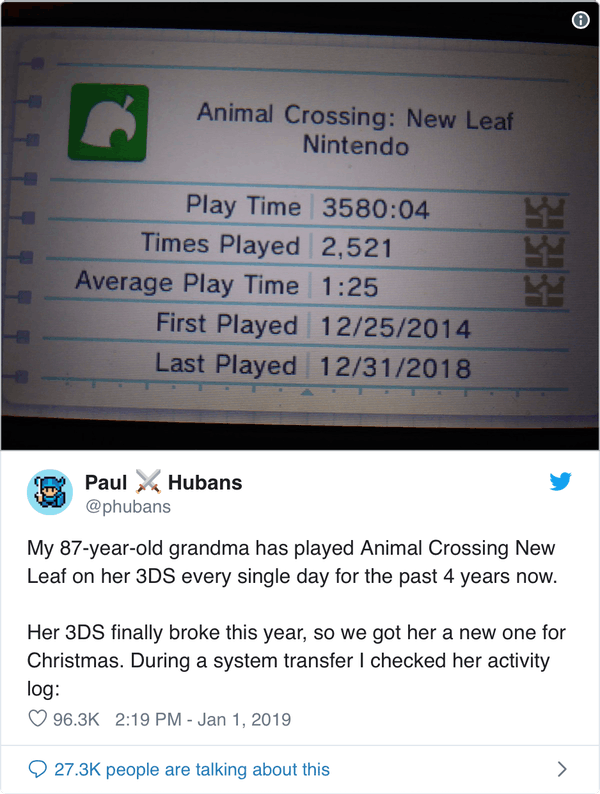
Earlier this year, a Twitter user named Paul Hubans shared a screenshot from his 87 year old grandmother’s long-running Animal Crossing session; after four years of daily play, she had logged 3,580 hours—nearly 150 days—of total playtime.
Being able to save progress in a game and return to it later has enabled some amazingly deep experiences. It wasn’t always like this, so how did we get here? Let’s find out by taking a look back at the history of saved games.
(Before we begin, it’s worth pointing out that home computers had a very different set of trade-offs than video game consoles, and saved games were pretty much there from the beginning for computer gamers. This article is focused on the history of saving games on gaming consoles, which was a much more interesting journey.)
In the beginning, there was…not much. Video games were simple, ephemeral experiences—put a quarter into the Pong machine, play until you lose the game, and then move on with your life. The earliest commercial video games were built using discrete logic components, rather than more capable microprocessors1, and this put a cap on the complexity of the gaming experiences they could offer. Fortunately, for folks living through the dawn of video gaming in the mid-1970s, it was more than exciting enough.
Things began to change in the late 1970s, as the cost of microprocessors fell and home computers became more accessible for the average consumer. This led to the first great divide in video gaming: one one side you had the pure gaming experiences offered in arcades and on dedicated home video consoles, and on the other side you had the the different set of gaming experiences that multi-purpose home computers could offer. Home computers generally lagged far behind dedicated gaming consoles in terms of graphics and sound capabilities, but had an early lead in data storage, at first thanks to floppy disks and later due to capacious hard disks. It would be a long time before game consoles caught up in that regard, keeping the focus on fast arcade action and away from deep, exploratory experiences.
Home video game systems like the Atari 2600 and Nintendo Entertainment System stored their games on cartridges containing ROM chips—read-only memory. Even if game developers wanted to offer more than simple arcade games, there just wasn’t anything for progress to be saved on.
The first home game to feature a password system was 1983’s Survival Island for the Atari 2600. Although primitive by today’s standards, Survival Island was a technical tour de force, featuring a large world to explore, the ability to populate and maintain an inventory of items, 3D mazes and, of course, passwords to let you pick up where you left off the next time you wanted to play. It’s one of just a handful of 2600 games to feature a password at all.
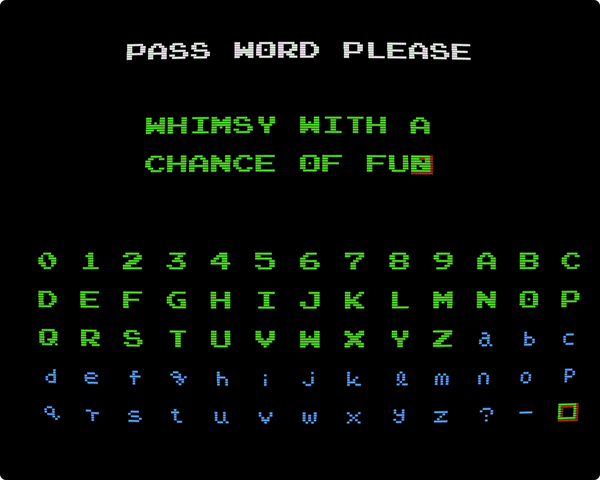
The password entry screen for Metroid (1986), one of the first NES games to feature passwords.
Passwords really hit their stride on the Nintendo Entertainment System a few years later. The NES was a technological leap beyond the 2600 and could offer much richer gaming experiences. Password-backed games began appearing a little more than a year into the NES’s North American lifetime, starting with Konami’s May 1987 release of Castlevania. By June of that year, Nintendo itself was promoting a line of “Password Pak”-branded games at the summer CES trade show2, starting with Kid Icarus and Metroid.
Passwords caught on in a flash, and it was common for gamer kids to keep a notepad next to their controller. Passwords were both treasured and traded, shared on playgrounds and even published in magazines and books3.
Passwords opened up a new level of possibilities for gaming, but they were still limited. Passwords could only store so much information before becoming unreasonably long, and even writing down even short passwords was still a distraction from playing the games. In Japan, both of Nintendo’s premiere Password Paks had been released on the Japan-only floppy disk drive add-on for their home console. Using a floppy disk meant that progress could be saved directly on the game disk itself, freeing players from the tedium of copying down passwords on slips of paper and the responsibility of keeping track of them afterwards.
What the world needed was another technological leap. How could progress be saved onto game cartridges that were inherently read-only?
Nintendo announced the next leap at the very same trade show that unveiled their Password Paks. The Legend of Zelda, already available in Japan on floppy disk, would be coming to North America on a cartridge. Instead of passwords, it would feature the same true saving system as its Japanese counterpart. Nintendo pulled this off with a clever piece of engineering: inside of the cartridge was a small, long-lasting battery that effectively tricked the game into thinking it was never turned off, allowing it to store progress for up to three different gaming sessions.
The Legend of Zelda wasn’t the first battery-backed cartridge4 or even the first game to use a battery backup5, but it was still a major leap forward. Previous battery-backed cartridges required gamers to insert their own AA batteries, making the cartridges awkward and heavy. The Legend of Zelda, on the other hand, just seemed like an ordinary game.
Nintendo had originally planned to bring their disk drive add-on to consoles around the world, but the Legend of Zelda—a marquee disk title just the year before in Japan—ended up being the the final nail in the coffin for the add-on instead. The Nintendo Disk System had initially been developed to provide more space for larger games and the ability to save a player’s progress as they went, but advances in cartridge technology rendered them obsolete within the year. Cartridge capacities had grown ever larger, and with the advent of battery-backed saving, both of the disk’s major innovations had made their way to vanilla consoles.
Over the next few years, both passwords and batteries would grow in popularity. At first, passwords were the go-to solution for simple progression, with batteries reserved for more complex adventure and role-playing games. But as the 1980s bled into the 1990s, battery-backed saving became more commonplace. Of the five launch titles for Nintendo’s second North American home console, two would feature battery-backed saving.
Cartridges had successfully fended off the threat of obsolescence once before, but at the dawn of the decade, they faced a new challenge: CD-ROMs. First available to Japanese console gamers with NEC’s 1988 add-on for their PC Engine console (North America’s TurboGrafx-16), the technology started going mainstream in the West with Sega’s 1992 add-on for their much more popular Genesis console. Games on CD-ROM offered a tremendous leap in storage capacity, hundreds of times larger than any cartridge of the day, but had an Achilles Heel—they had no way to store a player’s progress. Unlike cartridges, which were flexible enough to incorporate innovations like battery-backed saving within their hard plastic shells, CDs were just CDs. There would be no clever new add-ons within.
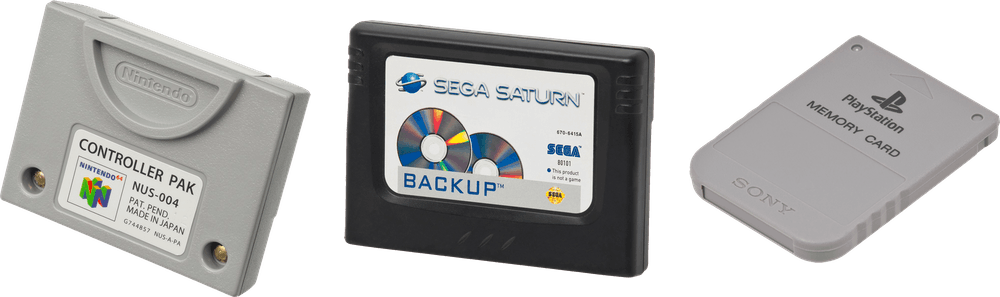
The solution? To keep using cartridges, sort of. Both NEC and Sega included memory for save games into their CD-ROM consoles, but Sega went a step further by also introducing their CD Back Up RAM Cart, which not only increased the space available for saved games, but also made it possible for players to bring their save games over to other consoles when visiting their friends. The Back Up RAM Cart effectively took the battery-backed saving technology of the Legend of Zelda and put it in a cartridge all by itself, sans game6.
Nintendo 64 Controller Pak, Sega Saturn Backup cartridge, Sony PlayStation memory card. (Not shown to relative scale.)
Subsequent disc-based consoles of the 1990s embraced the concept of memory cards with open arms. Sega’s follow-up console, the Saturn, followed the same internal memory + backup cartridge model as the Sega CD, but it proved to be an aberration. Sony’s PlayStation and all subsequent disc-based systems from the major players used memory cards exclusively. Even the Nintendo 64, famous for being a cartridge-loving holdout in the age of optical discs, offered memory cards (although plenty of its games still used battery-backed cartridges instead).
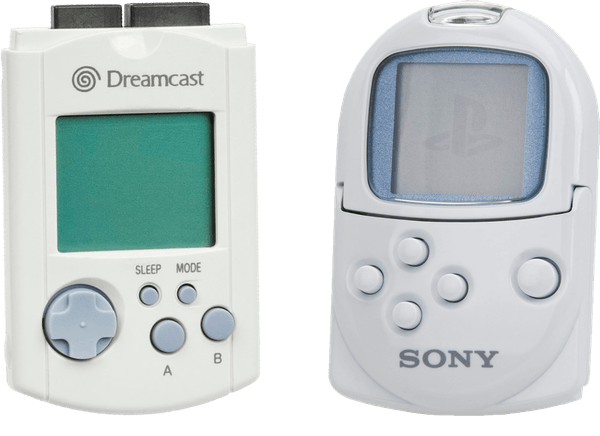
Left: Sega Dreamcast Visual Memory Unit Right: Sony PocketStation memory card
The high point of memory cards was probably the release of the Sega Dreamcast, which featured so-called Visual Memory Units in place of ordinary memory cards. These memory cards were tiny game systems of their own, capable of holding saved games but also of downloading software from their host system. The VMU made entirely new experiences possible. For example, Sonic Adventure let players transfer Tamagotchi-like “Chao” to their VMUs, where they could level up their stats while away from their gaming console. Sony attempted to match this capability with their PocketStation line of peripherals for the PlayStation, but the idea didn’t really catch on. This made smart memory cards more of a historical curiosity than a glimpse of the next big thing.
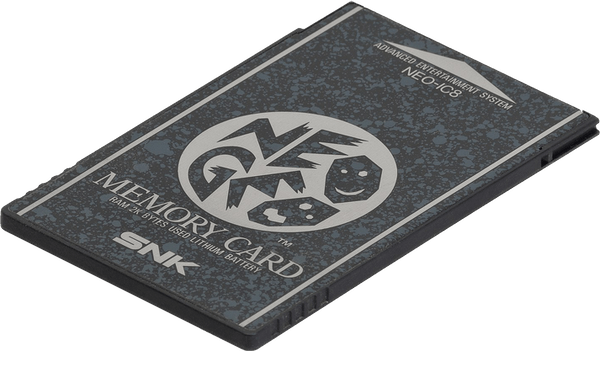
The first video game console memory card, released for the Neo Geo AES in 1990.
Gamers quickly took to the idea of bringing their saved games with them when they left home. In addition to letting players share their progress and collaborate, memory cards also gave them an avenue for sharing competitive information and records of their gaming prowess. Inevitably, arcade games saw an opportunity to enhance their appeal, leading to a handful of memory card-compatible arcade experiences.
The first company to bring this idea to market was SNK, a publisher that’s mostly known for fighting games. These sorts of one-on-one games bred plenty of healthy competition between gamers, making them a natural fit for the idea of saving high scores and personal records. When SNK released a home console—effectively a repackaged version of their arcade hardware—including support for memory cards there, too, made sense.
Konami’s Dance Dance Revolution offers another popular example of arcade memory card use. Some DDR arcade cabinets were equipped with Sony PlayStation memory card slots, allowing gamers to save their customizations and high scores between sessions, and some customizations from the home console carried over to the arcade game.
Nintendo got in on the idea with 2003’s F-Zero AX, an arcade peer to F-Zero GX, released on the GameCube in the same year. F-Zero AX had a GameCube memory card slot, and much like DDR, allowed the player to bring customizations from their home game into the arcades.
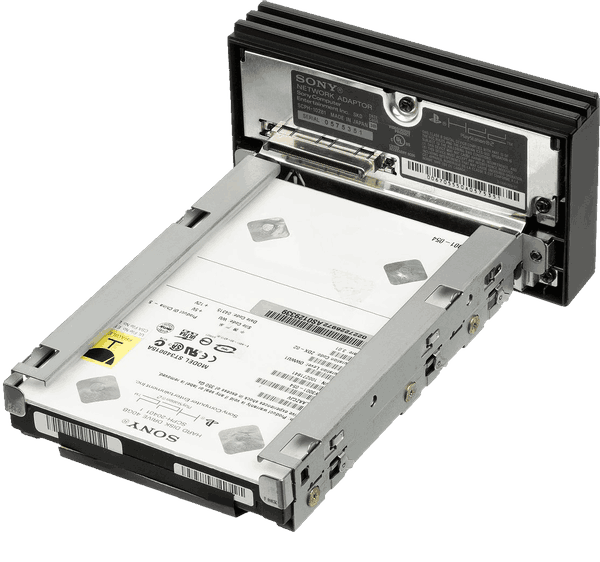
Sony PlayStation 2 hard drive with network adaptor
Despite their convenience, memory cards had one huge drawback: storage capacity. Around the turn of the century, the industry transitioned from battery-backed memory to non-volatile flash memory—the same thing you’d find in a USB flash drive or a camera’s memory card. Unfortunately, flash memory was still wildly expensive back then, meaning memory cards remained cramped. Frustrated gamers had to adopt a mercenary sort of attitude while digging through the contents of their memory cards, trying to make room for a new game by deleting their progress in another.
An alternative to memory cards appeared during the sixth generation of consoles. Microsoft’s first Xbox made history as the first console to come with a hard disk built in as standard equipment, and the PlayStation 2 supported hard drives as an optional add-on. Hard disks opened up a lot of new possibilities for gamers, including what was effectively unlimited storage for saving gamers’ progress.
Both the PlayStation 2 and Xbox supported traditional memory cards as well, but their 8 MB capacities were nothing compared to the hard disks inside the consoles themselves (4 or 8 GB for the Xbox and a whopping 40 GB for the PlayStation 2). The reign of the memory card was over.
With all of that space available, gamers were finally free of the dreaded “what will I miss least?” decision making process associated with making room on their memory card. Better yet, games could begin assuming that they were always allowed to save—rather than an event that might happen at the end of a play session, saving progress could happen much more often, and without necessarily overwriting what had been saved before. This, pardon the pun, really was a game-changer, leading to the invention of auto-saves. Auto-saves meant that the game itself decided when it should save the player’s progress, freeing gamers from yet another bit of minutiae and saving them from unpleasant events like power outages or game freezes that might’ve led to a loss of progress in years gone past. Some games even manage to leverage auto-saves to discourage cheaters7.
By the time the seventh generation of home consoles landed in 2005, both hard disks and network connectivity were standard features. At first, that connectivity was focused on online multiplayer gaming, but over time, more and more network-aware features appeared in consoles. Sony and Microsoft both added cloud saves to their consoles within the span of a few months in 201189, untethering save games from physical hardware and giving gamers the freedom to pretty much stop thinking about them.
Putting saved games on the cloud had a number of advantages, the most obvious being safety. If your console met some unpleasant fate—a very real possibility for Xbox 360 users—at least you wouldn’t lose your precious saved games. And on a more upbeat note, you were also free to sign in to your account on a friend’s console and pick up where you left off (assuming you had a copy of the game with you). After a decade of being trapped inside of memory cards and hard disks, saved games were untethered and free for the first time.
Over the past three decades, saved games have moved from scraps of paper to cartridges to memory cards to hard drives to…somewhere out on the internet. With the move to the cloud, save games have probably achieved their ultimate form. Storage and connectivity are so commonplace that many games just continuously save progress in the background.
At the same time, we may all have lost something special. Kids in the 80s traded passwords on scraps of paper. Kids in the 90s stuffed memory cards in their backpacks and brought their games over to friend’s houses. Kids in the 2000s gained the amazing ability to play against each other no matter where they were, but lost that little bit of magic that came from taking care of a precious physical thing.
No one would want to go back to the way things were, but it’s still worth remembering. Next time you notice a “saving…” animation in the corner of your screen, take a moment to think about how far we’ve come. It’s really pretty amazing.
Here’s hoping Paul Huban’s grandmother’s new 3DS is good for another 3,000 hours of Animal Crossing.
Many thanks to my patient and helpful wife, Nathalie, for copyediting this article, and to Ernie Smith of Tedium for suggesting I expand the scope from a history of memory cards to the entire history of save games.
The first microprocessors went on the market in 1971, about a year before the release of Pong, so it’s not surprising that early games weren’t using microprocessors from the very start. ↩︎
Sega wasn’t the first to bring the idea of memory cards to home console—SNK’s 1990 release of their Neo-Geo AES beat them to market by more than a year. Although the AES was a cartridge-based system (and theoretically could’ve used battery-backed saves like other consoles), it used memory cards in order to support interoperability with their arcade cabinets. ↩︎
Most of the MegaMan Battle Network games auto-save the game before revealing the result of a trading minigame, preventing players from resetting if they don’t like the result. (Source) ↩︎
]]>Using GitHub webhooks to rebuild static web sites2019-01-26T00:00:00+00:002019-01-26T00:00:00+00:00https://writing.markchristian.org/2019/01/26/watchnrunGitHub’s webhooks are wonderful things: with a little bit of configuration, you can be notified whenever your repository has new code pushed to it.
This web site is powered by Jekyll, a static site generator. My build process for it basically looks like this:
ssh markchristian.org
cd /home/mark/writing.markchristian.org
git pull origin master
bundler install
jekyll build
It’s not particularly onerous, but it’d be nice if it just happened automatically whenever I pushed a change. As a hypothetical future bonus feature, if all I had to do was commit to the repository, it’d be a lot easier to update the site from my iOS devices.
Receiving webhooks
Webhooks are just HTTP requests, made to a URL that you specify. I didn’t want or need anything complicated from the webhook—just a little nudge to let my server know that a change had occurred. I’m using DreamHost, and the path of least resistance there is to use PHP. So, I started out with a webhook that looked like this:
You’ll note that this has absolutely zero validation to make sure that the request actually came from GitHub. If this was a more serious integration that actually did something with the incoming information, I’d actually secure my webhook, but since the only information we want is “something happened”, it’s fine without it.
Unfortunately, this first implementation didn’t work, and for an obvious security reason: web requests aren’t handled by the same user account that I log in with. Of course we don’t want our Apache process to be able to access my SSH keys (to update the local checkout of the git repo) or update Ruby gems. The question was: what to do? Something needed to be able to do those things in order for this to work.
Updating a status file
One thing my PHP endpoint could do was write a file to my user account. So, I updated my webhook:
Now, whenever the webhook was hit, it’d write to a file called /home/mark/webhook-was-called. It doesn’t matter what, if anything, you write, or even whether it’s different than what’s already in there, but I figured that knowing the timestamp of the last webhook call might come in handy someday.
The next step was to create something that ran within my user account and watched that file for changes.
Watching for changes
There are a few ways of watching files for changes, but none of them were quite as simple as what I wanted. I ended up creating a simple new tool called watchnrun, which is a very simple command-line wrapper around the excellent listen Ruby gem. It’s used like this:
At this point, everything did exactly what I wanted:
I’d push a change to this site’s GitHub repository
GitHub would make a request to my webhook
My webhook would write to /home/mark/webhook-was-called
watchnrun would run /home/mark/bin/pull-and-update-site.sh
The last problem was that I needed to have watchnrun running all the time.
Running watchnrun in the background with screen
If I was using on a dedicated server rather than DreamHost’s shared hosting, I could’ve configured this to run at startup automatically, but DreamHost’s servers are (rightfully) pretty locked down. I needed an alternative. Fortunately, the server I’m on restarts very rarely, so having to manually start it up wouldn’t be the end of the world.
screen gave me the last piece of the puzzle. For those who are not familiar with screen, it allows you to start a terminal session and “detach” it, leaving it running in the background even if you end your terminal session. It was just what I needed.
The -d tells screen to detach at startup. The m tells it always create a new screen session, even if there’s already one running. The S tells it to give that screen the name hooks-writing-watcher, so I can re-attach to that session if I want to by typing screen -x hooks-writing-watcher.
It worked!
That was all I needed: I now had a perfectly functioning system that did exactly what I wanted it to. This was a fun exercise; I learned a bit more about GitHub webhooks and built myself a fun new tool that will surely come in handy again in the future. Hopefully, someone else will find it useful someday, too.
]]>The life & times of the Nintendo 64 controller2019-01-01T00:00:00+00:002019-01-01T00:00:00+00:00https://writing.markchristian.org/2019/01/01/n64-controllerThe 1990s were a wild time for the video game industry. Advances in technology had finally brought true 3D graphics to video gaming, and although this innovation was initially confined to the arcades, the march of technology brought it within reach for home gaming consoles.
The leap into the third dimension meant that the simple joypads of yesteryear weren’t nearly as capable as they once were, catalyzing a period of experimentation and iteration with influences that are still felt today.
Of the initial set of 3D consoles, it was the Nintendo 64 that came with the most alien-looking controller. More than two decades on, it is still one of the most divisive designs in video game history. Proponents lauded its forward-thinking adoption of analog controls, while detractors criticized its ungainly three-pronged design. Was the N64 controller an insightful glimpse of the future, or an evolutionary dead end?
It may not be the greatest video game controller ever made, but it’s arguably the most interesting. Let’s take a look back at the controller that tried to change the world—its origins, competitors, and descendants—to see if we can understand its place in gaming history.
The N64 controller featured a novel—and ultimately unique—three-pronged design. The idea was to put the optimal type of input—directional pad or analog stick—under your thumb at any given time, although this wasn’t immediately obvious to all first-time users1. You’d always hold the rightmost prong in your right hand, and you’d hold either the leftmost or center prong in your left hand. When you were using the analog stick, you’d naturally find your index finger positioned over a trigger button, often used for primary actions. With your right hand, you had easy access to the other action buttons (B and A) as well as four C buttons, which would often control the virtual camera in 3D games. The top edges of the controller had a shoulder button on both sides, although these tended to be used less often than in prior systems.
In addition to its distinct layout, the N64 controller had something else up its sleeve: an expansion slot of its own. Up to four controllers could be plugged into the N64, and each could hold a proprietary expansion device of one sort or another, a feature unlike anything offered on the other consoles of its generation. Subsequent consoles such as the Dreamcast and Xbox would explore this idea further, but no other console from Nintendo leaned on this idea as much as the N64.
Several different “paks” were released over the course of the console’s lifetime, adding support for saving game data (the Controller Pak), force feedback (the Rumble Pak), and even interoperability with Game Boy and Game Boy Color games (the Transfer Pak).
The design of the N64 console was revealed to the public in mid-1994, but the controller was kept under wraps. The anxious gaming press had to wait for more than a year before the controller was revealed—and made available for play—at Nintendo’s annual trade show in November 1995.
At a time when the competition’s controllers looked like they would’ve been at home with any of the systems of the previous generation, the N64 controller bucked trends and turned heads. Fortunately for Nintendo, early reactions were positive. Nintendo Power—unbiased as ever—wrote that it was “a significant step above every other controller in the world”2. The theoretically-less-biased Electronic Gaming Monthly declared that the controller was “the most revolutionary and easy-to-use stick ever to come out for video games”3, and GamePro opined that “[it] looks strange, but it feels super smooth”4. People got it.
At first glance, the controller looked like a sharp break from anything else that people had seen before. Looking a bit closer, however, shows that it wasn’t completely novel. Its design was motivated by the fact that gaming in 3D required different solutions for input compared to a 2D system—but fortunately, the Nintendo 64 wasn’t Nintendo’s first 3D-focused system. That honour goes to the Virtual Boy, a short-lived console that launched in 1995 but was discontinued barely a year later. It was a notorious flop.
Just as with the Nintendo 64, the Virtual Boy needed a solution to the problem of moving around in three dimensions. Its solution? Dual directional pads, one for each thumb.
The d-pads were still digital, so the system couldn’t offer the smooth control of an analog stick, but having two of them meant that games could be designed with a new degree of freedom in three dimensional space.
Dual d-pads aside, the Virtual Boy controller shares a few other design cues with its more popular cousin. First of all, like the N64 after it—but unlike the Super Famicom that preceded it—the Virtual Boy had just two primary action buttons (B and A, much like the NES). If you squint at it hard enough, it’s easy to see the legacy of the Virtual Boy’s “B, A, d-pad” layout when looking at the N64’s “B, A, C buttons” layout.
Second, large grips on each side make the N64 controller more comfortable to hold for extended periods of time. This innovation may have been cribbed from the design of the Sony PlayStation’s controller, released two years before the Nintendo 64. Of course, the PlayStation controller was heavily inspired by Nintendo’s Super Famicom. Everything is a remix.
The mid-90s had no shortage of interesting game consoles for us to contemplate, but in the end, there were just two major competitors that Nintendo had to worry about: Sega’s Saturn and Sony’s PlayStation.
Sega Saturn
The Saturn controller was a simple evolution of the six-button Mega Drive (aka Genesis) controller, adding a pair of shoulder buttons but changing little else.
Left: Six-button Mega Drive controller — Right: Saturn controller
Sega would eventually follow up with the 3D Control Pad, released in mid-1996, but it never became the default controller for the console. Although it was released (and patented!) well after the Nintendo 64’s controller, Sega still had plenty of original ideas.
The 3D Control Pad’s patent document5 shows that Sega wasn’t just copying Nintendo. Most notably, it laid out the potential for force feedback, well before Nintendo’s Rumble Pak. Even more amazingly, it described motion controls, a full decade before those would go mainstream with 2006’s Nintendo Wii and Sony PlayStation 3.
Sony PlayStation
The PlayStation controller was, oddly enough, an evolution of Nintendo’s own Super Famicom controller, adding grips for each hand and an extra pair of shoulder buttons, but retaining the same basic layout. This resemblance is less strange than it may seem at first, given the PlayStation’s origin as a joint venture between Sony and Nintendo6.
Left: Super Famicom controller — Right: PlayStation controller
Possibly due to its position of relative strength in the market at the time, Sony would wait until 1997 before making any changes to the PlayStation controller. The Dual Analog controller was released as an alternative to the bundled controller in April 1997, but was only on the market for about six months before it was replaced by the DualShock controller. Unlike Sega with its 3D Control Pad, Sony replaced the controller that came bundled with the PlayStation. The Dual Analog controller featured only a relatively simple modification to the original, adding a pair of analog sticks at the bottom of the existing controller design, while DualShock extended it to include vibration as well. Incredibly, this same basic layout has persisted throughout all subsequent PlayStation consoles, an unbroken line stretching back more than two decades.
If you happened to stay at a hotel around the turn of the millennium, you might’ve been surprised to see a bizarre Nintendo 64 controller attached to your hotel room’s television.
This was the interface to a service called LodgeNet, which offered pay-by-the-minute access to some of the banner Nintendo 64 titles. By September 2000, there were more than half a million controllers in rooms in more than a thousand hotels.
iQue Player
The iQue Player was an incompatible variant of the Nintendo 64 sold only in China, released in 2003. Its design is noteworthy for several reasons.
The most obvious change was the removal of the third prong in favor of a more traditional gamepad layout. It also swapped the placement of the analog stick and d-pad, matching the layout of the GameCube controller and most of the following gamepad-style controllers from Nintendo. Oddly enough, it used a non-standard d-pad shape, unlike anything seen on other Nintendo products. Finally, it’s worth pointing out that the controller was the iQue Player: the console was embedded inside of the controller itself. It’s amazing what seven years of hardware progression can do.
The controller’s most notable innovation—the analog stick—was the source of quite a lot of trouble over the years.
Mario Party 3 was a collection of mini-games for the console, and one of the mini-games encouraged players to rotate the analog stick as quickly as possible. This sort of intense usage would cause a mysterious white powder to appear at the base of the analog stick. This turned out to be the plastic wearing away from a delicate internal component. These days, it can be tricky to find a vintage N64 controller with an analog stick that still works well—many flop around, loose and unresponsive.
Frantic competitive play combined with a hard piece of plastic topped with ridges led to players getting blisters and friction burns. An investigation from New York’s Attorney General led to Nintendo setting aside $80M for special gloves to prevent injury while playing in March of 20007. (Nintendo also reimbursed the state for its legal fees.)
Video game consoles, at least in the 90s, were designed to survive extended contact with young children. This meant that they were built to last, and generally still work just fine today. Unfortunately, the Nintendo 64 controller’s finicky analog stick means that any vintage gaming aficionado has probably dipped their toes into aftermarket replacement parts.
Aftermarket options run the whole spectrum, with something for pragmatists and purists alike. Those who’d like to preserve their controllers as much as possible might opt to swap the faulty plastic components with sturdy metal replacements. Gamers who are less picky can just replace the entire analog stick. And those with less interest in using a genuine controller can pick up an third party option. These days, there are two good third party controllers to choose from: one is old, and one is new.
The Hori Mini Pad came out during the N64’s lifetime, but only in Japan. It shrunk the size of the controller substantially, ditching the middle prong and swapping the placement of the analog stick and d-pad. These changes gave it a button layout more like the Xbox controller than any of Nintendo’s controller. Hori Mini Pads are still prized by enthusiasts today and command a relatively high price.
More recently, the Brawler64 Gamepad set imaginations alight with a wildly successful crowdfunding campaign. This controller looks like a cross between a Nintendo Switch pro controller and the N64 original.
In the 80s and early 90s, most game controllers looked like Nintendo’s controllers. From the mid-90s onward, though, that would rarely be true again. This didn’t stop Nintendo from innovating, however. The GameCube controller is a brightly colored lump of plastic that fit perfectly into human hands. The Wii controller was inspired by television remotes, aiming to be as unthreatening as possible to casual gamers. The Wii U controller has a large, integrated touchscreen to try to capture the sorts of gaming experiences that were possible on modern mobile devices. The Switch controllers break into two pieces to allow multiplayer action anywhere.
Without the benefit of hindsight, it’s easy to see the N64 controller as a misstep—a weird evolutionary dead-end. That attitude doesn’t do the controller justice, however. Nintendo’s legacy of innovation stretches back decades, but the design of the N64 controller is they really let loose and started to think outside the box.


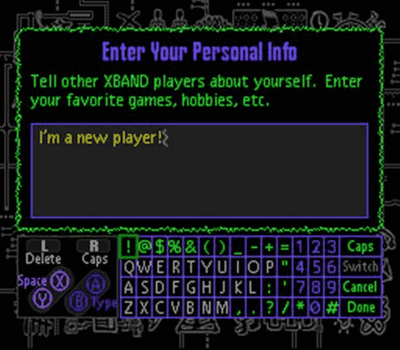
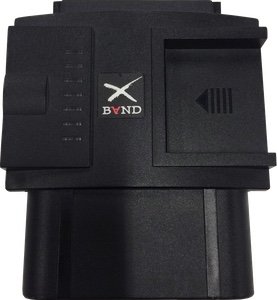
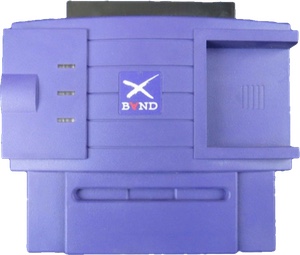

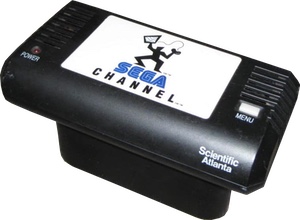
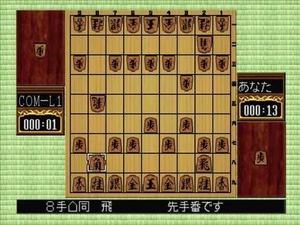
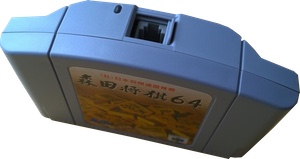
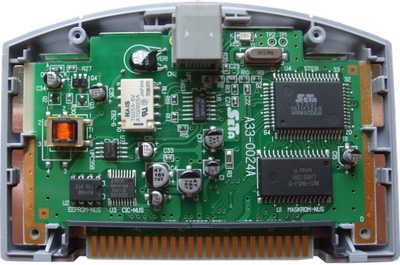

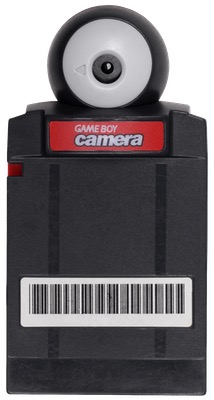 Released for the original Game Boy in 1998, the Game Boy Camera was an unusually shaped cartridge which included a fully functional digital camera and enough memory to store thirty photos. Despite producing photos that were microscopically tiny and grainy by modern standards, the Game Boy Camera was a big deal around the turn of the millennium, and it was even certified as the world’s smallest digital camera in the 1999 edition of The Guiness Book of Records
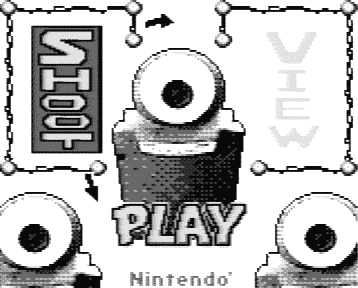 Appropriately given the playful platform it was created for, Game Boy Camera included a fun, quirky user interface that evoked the aesthetics of Nintendo’s WarioWare series. Off-kilter characters decorate every screen, and nearly everything jiggles and moves while it’s being used The cartridge not only let users take photos, it also allowed them to apply stickers or doodles to the photos, with the stickers looking just as kooky as everything else.
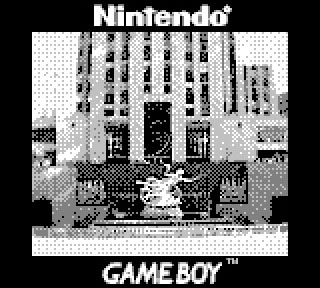 A few years ago, blogger David Friedman shared a treasure trove of Game Boy Camera photos of New York City, taken in 2000
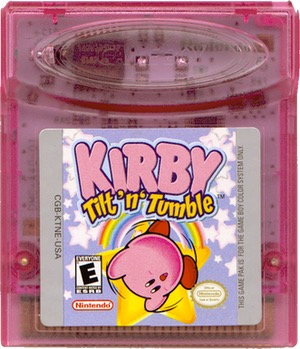 Kirby Tilt ’n‘ Tumble was the first instance of a new form of gameplay input being built into a Game Boy cartridge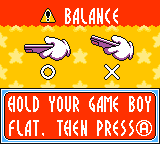
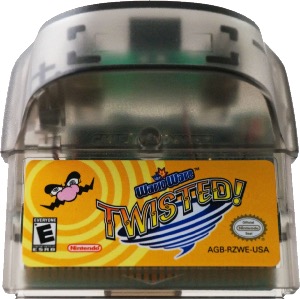 The second entry in the long-running WarioWare series, 2004’s WarioWare: Twisted! for the Game Boy Advance not only featured a custom input, but a custom output as well: a gyroscope detected how the player was holding their Game Boy Advance, and a small vibrating motor offered a rumble feature for force-feedback. Although the rumble feature wasn’t novel, the gyroscope was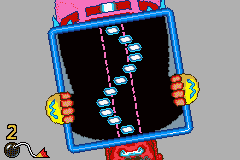
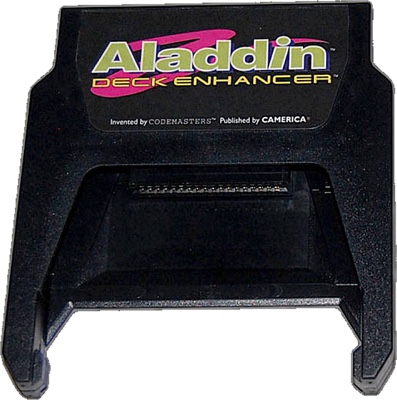
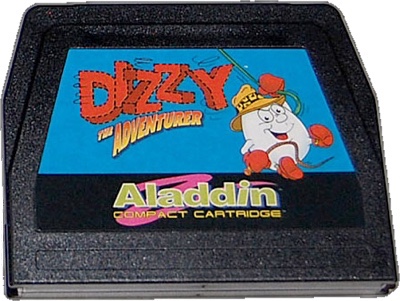
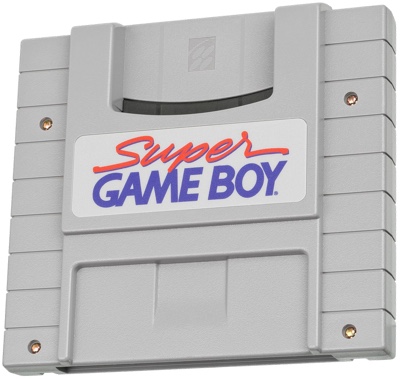
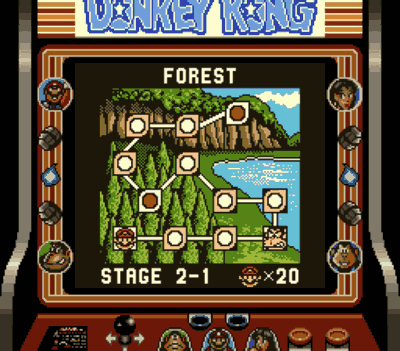
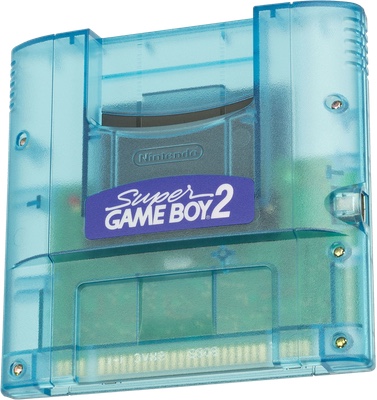
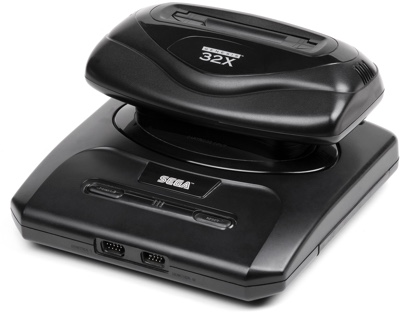
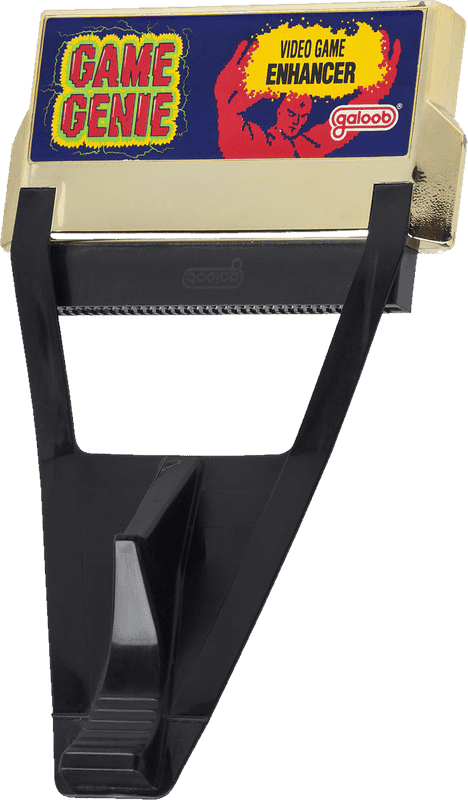 The Game Genie was probably the first video game cheat device that your average home console gamer ever encountered. This clever gadget sat between the Nintendo Entertainment System (NES) and standard game cartridges and gave gamers the ability to tweak difficulty levels, jump ahead in a game, or just have fun messing around with things.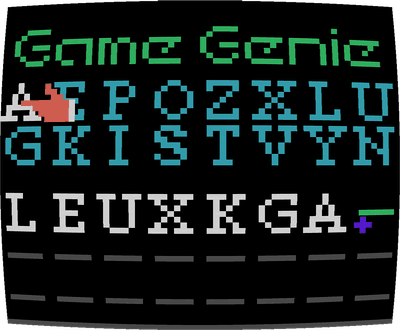
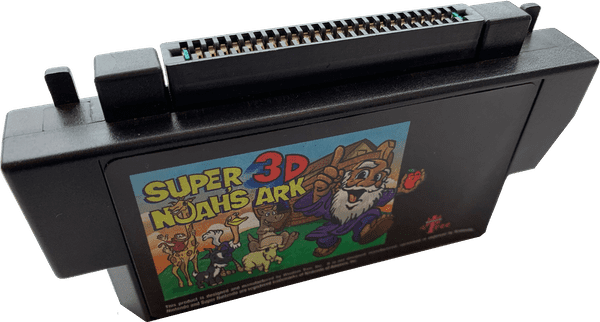
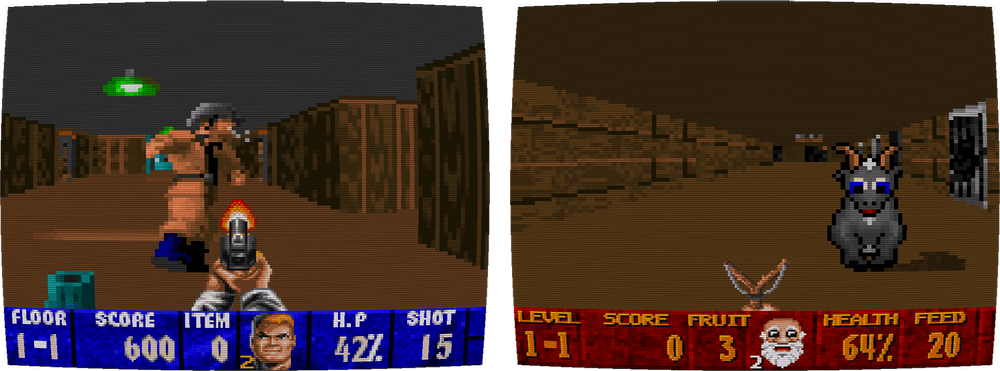
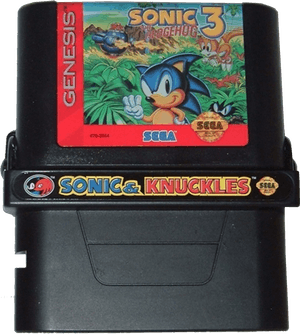
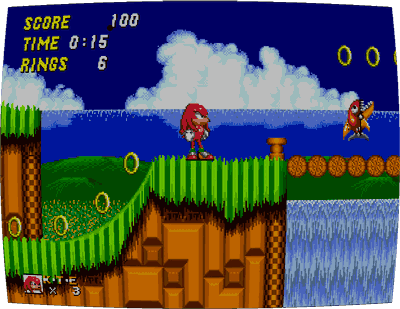 Sonic & Knuckles would read the data off the Sonic 2 cartridge and splice the character Knuckles in place of Sonic, with all of his abilities from later games intact. This meant that players could play with a fresh new character in a game that was released years before that character was even invented. It was a brilliant idea that went a long way toward making Sonic & Knuckles feel like a good value.
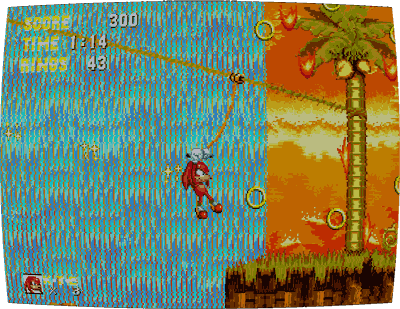 would give you Sonic 3 & Knuckles, a new experience that flowed smoothly from the levels of Sonic the Hedgehog 3 to those of Sonic & Knuckles. This combination is considered the “real” version of the game, and its unusual release strategy is the famous result of tight time constraints—Sega released the first half of the game as soon as it was ready, and released the second half as this lock-on cartridge later in the year